 OriginQ Cloud

VQNet SKILL Library
Make Your AI a Quantum Machine Learning Expert, generating trainable code with one sentence
 Github
SKILL Overview
VQNet Quantum Machine Learning Skill Library
Quantum Machine LearningDifferentiable Quantum LayerModel Training & TuningQuantum-Classical HybridDistributed TrainingIt is a skill package that "injects a quantum machine learning engine" into the AI assistant. Once loaded, your AI assistant learns quantum machine learning and produces trainable code with no extra configuration: just describe your task in natural language, and it can handle quantum tensor computing, build quantum circuits and classical neural networks, and write variational quantum classifiers, while also wrapping quantum circuits into differentiable quantum layers, covering the full workflow of code generation and methodology guidance from building and training quantum-classical hybrid models all the way to real-device deployment.
Capability Scope
Through loading the VQNet Quantum Machine Learning SKILL Library, AI can help you complete the following tasks:
| Capability Domain | Specific Content |
|---|---|
| Quantum Tensor Computing | QTensor autodiff tensors, dtype system, GPU acceleration, CPU/GPU device management |
| Classical Neural Networks | Linear, Conv2D, BatchNorm, LSTM layers; loss functions & optimizers; consistent with mainstream ML frameworks |
| Quantum Circuit Construction | QMachine quantum VM, Hadamard, RX, RY, RZ, CNOT gates, complex circuit composition & measurement |
| Quantum Layer Encapsulation | QuantumLayer, QuantumBatchAsyncQcloudLayer, NoiseQuantumLayer, QuantumLayerAdjoint |
| Variational Quantum Circuits | Built-in autodiff simulation, parameterized circuits, hardware-efficient ansatz, amplitude/angle embedding, QNG & QNSPSA optimizers |
| Quantum Information Analysis | Probability measurement, expectation values, quantum entropy, mutual information |
| QML Algorithm Applications | Quantum classifiers, QVC, QDRL, Quanvolution, quantum-classical hybrids (CNN + QNN) |
| Distributed Training | MPI multi-process CPU training, NCCL GPU communication, multi-node, pipeline/tensor parallel, ZeRO optimizer |
| PyTorch Backend | Seamless torch backend switch; state-vector circuits (sv.torch) & tensor-network circuits (tn.torch) |
| LLM Operators & Fine-Tuning | Scaled softmax family, top-k/top-p/min-p sampling, fused_moe MoE operator, trl fine-tuning losses |
| Quantum LLM | quantum-llm with Llama Factory for VQC-based LLM fine-tuning |
| Real-Device Support | Works with quantum programming MCP for device status query, task preparation & submission |
Usage Method
This SKILL supports the following installation methods:

Import Folder / Compressed Package
Directly import the SKILL folder or .zip package in the client to complete SKILL installation.

Manually Place to Specified Path
Copy the SKILL folder to the corresponding skills directory of the tool to complete SKILL installation.

One - click Configuration Script
Execute the one - click configuration script to quickly complete MCP service configuration and SKILL synchronization installation in the tool.
 Note: If you find the above installation methods difficult, you can also send the SKILL folder to AI and tell AI: Help me install this SKILL
Specific Installation Steps:
Open the tool's settings page, find the relevant entry for SKILL settings (names vary by tool, such as “Skills”, “Manage SKILL”, etc.), import the SKILL folder and save to enable.
Taking CodeBuddy as an example:
Open the CodeBuddy settings page
Select "User SKILL" or "Project SKILL" as needed
Choose the pyvqnet-skills folder and confirm
Click "Skills"
Click "Import SKILL"
Copy the pyvqnet-skills folder to the corresponding tool's skills directory, restart or refresh the tool to take effect.
When installing SKILL in local AI Coding tools, it is usually divided into global skills and project skills. The common tool installation paths are as follows:
| Tool | User/Global Skills Directory | Project Skills Directory |
|---|---|---|
| OpenCode | ~/.config/opencode/skills/ | <project>/.opencode/skills/ |
| Claude Code | ~/.claude/skills/ | <project>/.claude/skills/ |
| Gemini CLI | ~/.gemini/skills/ | <project>/.gemini/skills/ |
| CodeBuddy | ~/.codebuddy/skills/ | <project>/.codebuddy/skills/ |
| Cline | ~/.cline/skills/ | Global Only |
Note: Web - based AI tools usually do not involve local directories. You can import folders or .zip packages in the platform's Skills management interface.It can help you automatically complete MCP configuration and SKILL installation.
| What you need | Version requirements | Description |
|---|---|---|
| Python | ≥3.11 | Python needs to be installed on the computer |
| UV | — | A Python package management tool, the script uses it to automatically handle dependencies |
Currently, a variety of AI coding tools are supported: OpenCode, Claude Code, Codex, Gemini CLI, CodeBuddy, Cline, and others; you may also run the script below to check the supported list in real time, which we update periodically.
uv run prepare_qpanda3_ai_kits.py listOpen the terminal, cd to the directory where the script is located, and run the following command to complete:
uv run prepare_qpanda3_ai_kits.py prepare <Tool Name> -k <Your API_Key>For example, if you are using CodeBuddy, after running the following command, the script will automatically help you write the MCP server connection information into CodeBuddy's configuration file, and then install the VQNet quantum machine learning skill package to CodeBuddy's skill directory:
uv run prepare_qpanda3_ai_kits.py prepare codebuddy -k <Your API_Key>The corresponding to the 6 AI coding tools in the command line is as follows:
| Tool Name | Command Line Parameter Name |
|---|---|
| OpenCode | opencode |
| Claude Code | claude |
| Codex (OpenAI) | codex |
| Gemini CLI | gemini |
| CodeBuddy | codebuddy |
| Cline | cline |
Script supports two installation levels:
| Level | Specific Content |
|---|---|
| Global (Default) | uv run prepare_qpanda3_ai_kits.py prepare <Tool Name> -k <Your API_Key> |
| Project - level | uv run prepare_qpanda3_ai_kits.py prepare <Tool Name> -k <Your API_Key> -p |
If you are unsure of which tools are installed, or wish to configure all installed tools in one go, execute the command below without specifying a tool name. The script will automatically scan your system, identify installed supported AI tools, and configure them individually:
uv run prepare_qpanda3_ai_kits.py prepare -k <Your API_Key>If you no longer need it in the future and want to clean it up, it's very simple:
To uninstall the configuration of a specific tool:
uv run prepare_qpanda3_ai_kits.py uninstall <Tool Name>To uninstall the configuration of all tools:
uv run prepare_qpanda3_ai_kits.py uninstallIf you forget how to use the command at any time, run the following command to view all commands and parameter descriptions:
uv run prepare_qpanda3_ai_kits.py helpVerification method
Under most circumstances, the SKILL does not require manual invocation after installation. When you raise similar questions in AI conversations, the AI will automatically activate this SKILL:

AI Trigger Example
Automatically identify and activate SKILL
In the conversation, type the following questions, and the AI will automatically call this SKILL:
 If the AI can output complete and standard pyvqnet code, it means the SKILL has taken effect.

Typical Code Example
AI - generated pyvqnet code example
The following is a standard pyvqnet code example generated with AI assistance:
from pyvqnet.qnn.pq3.quantumlayer import QuantumLayer
from pyvqnet.qnn.pq3.measure import ProbsMeasure
from pyvqnet.tensor import QTensor
import pyqpanda3.core as pq

def circuit(input, param):
    cir = pq.QCircuit()
    cir << pq.H(0) << pq.CNOT(0, 1)
    cir << pq.RY(0, input[0])
    cir << pq.RZ(1, param[0])
No Install, Try Now
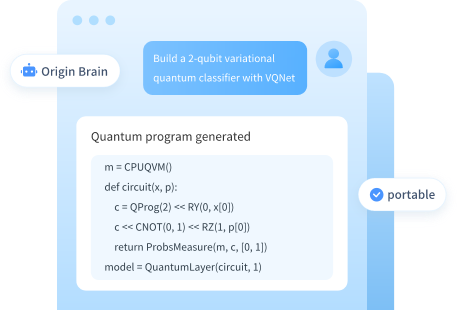
Origin Brain comes with the full VQNet SKILL Library built in — no installation needed, just one prompt to get started.
Experience the Complete Skill Library Without Installation
Experience complete VQNet quantum machine learning programming without installation — an on-desktop workflow designed for developers, researchers, and professional users.
 Open Origin Brain, chat directly
- Built-in complete VQNet quantum machine learning skill library, no configuration needed
- Generate quantum machine learning code with a single sentence