
Time Scheduling
API reference for parsing and drawing instruction schedules generated by QProg.to_instruction.
Imports
from pyqpanda3.visualization import (
    InstructionScheduleItem,
    parse_instruction_schedule,
    parse_instruction_schedules,
    draw_time_scheduling,
)
InstructionScheduleItem
InstructionScheduleItem is a frozen dataclass that represents one normalized instruction.
| Field | Type | Description |
|---|---|---|
name | str | Gate or marker name, such as RPhi, CZ, IDLE, or Measure. |
qubits | tuple[int, ...] | Physical qubit labels from the instruction stream before display offset is applied. |
start_time | int | Start cycle. |
duration | float | Duration in cycles. A duration of 0 is drawn as a marker. |
params | tuple[float, ...] | Gate parameters retained for inspection and merge decisions. |
order | int | Original stream index, used as a stable tie breaker. |
is_marker | bool | Whether the item is drawn as a zero-duration marker. |
end_time | float | Computed property equal to start_time + duration. |
Instruction JSON Format
The parser accepts the instruction shape produced by QProg.to_instruction. Each instruction is a single-key object:
| Instruction | Payload |
|---|---|
RPhi | [qubit, angle, phi, start_time] |
CZ | [q0, q1, start_time] |
MS | [q0, q1, start_time] |
IDLE | [qubit, duration, start_time] |
ECHO | [qubit, param, start_time] |
Measure | [[q0, q1, ...], start_time] |
A single scheduled stream can be passed as [{...}, {...}] or wrapped as [[{...}, {...}]]. Multiple streams must be passed as [[{...}], [{...}]].
parse_instruction_schedule
parse_instruction_schedule(
    instruction: str | Sequence,
    durations: Mapping[str, float] | None = None,
    backend: Any | None = None,
    strict: bool = True,
) -> list[InstructionScheduleItem]
Parses exactly one instruction stream. If the input contains multiple streams, this function raises ValueError; use parse_instruction_schedules instead.
parse_instruction_schedules
parse_instruction_schedules(
    instruction: str | Sequence,
    durations: Mapping[str, float] | None = None,
    backend: Any | None = None,
    strict: bool = True,
) -> list[list[InstructionScheduleItem]]
Accepts [{...}], [[{...}]], or [[{...}], [{...}]] and returns one normalized schedule per stream.
draw_time_scheduling
draw_time_scheduling(
    instruction,
    durations=None,
    backend=None,
    output="mpl",
    qubits=None,
    title="QProg Instruction Schedule",
    width=None,
    height=None,
    show_labels=True,
    label_policy="auto",
    max_qubits_per_panel=None,
    time_window=None,
    qubit_offset=-1,
    merge_common_instructions=False,
    gate_filter=None,
    filter_measure=False,
    time_range=None,
    plotly_lane_height=None,
    strict=True,
)
Returns a Matplotlib Figure for output="mpl" or a Plotly Figure for output="plotly". When the input contains multiple streams, returns a list of figures.
Duration Sources
Durations are resolved in this order:
- Explicit
durations, for example{"RPhi": 40, "CZ": 80}. - Backend timing attributes:
single_gate_timingforRPhi,double_gate_timingforCZandMS, andecho_gate_timingforECHO. - The
IDLEpayload duration. - Missing durations become zero-duration markers.
Examples
from pyqpanda3.visualization import parse_instruction_schedule, draw_time_scheduling

instruction = [
    {"RPhi": [20, 270.0, 90.0, 0]},
    {"RPhi": [29, 270.0, 90.0, 0]},
    {"CZ": [20, 29, 40]},
    {"RPhi": [29, 72.76854713789294, 90.0, 80]},
    {"Measure": [[29, 20], 120]},
]

items = parse_instruction_schedule(instruction, durations={"RPhi": 40, "CZ": 40})
print(items[0].name, items[0].end_time)
# Output: RPhi 40.0

fig = draw_time_scheduling(
    instruction,
    durations={"RPhi": 40, "CZ": 40},
    title="Two-Qubit Schedule",
)
fig.savefig("schedule.png", dpi=160)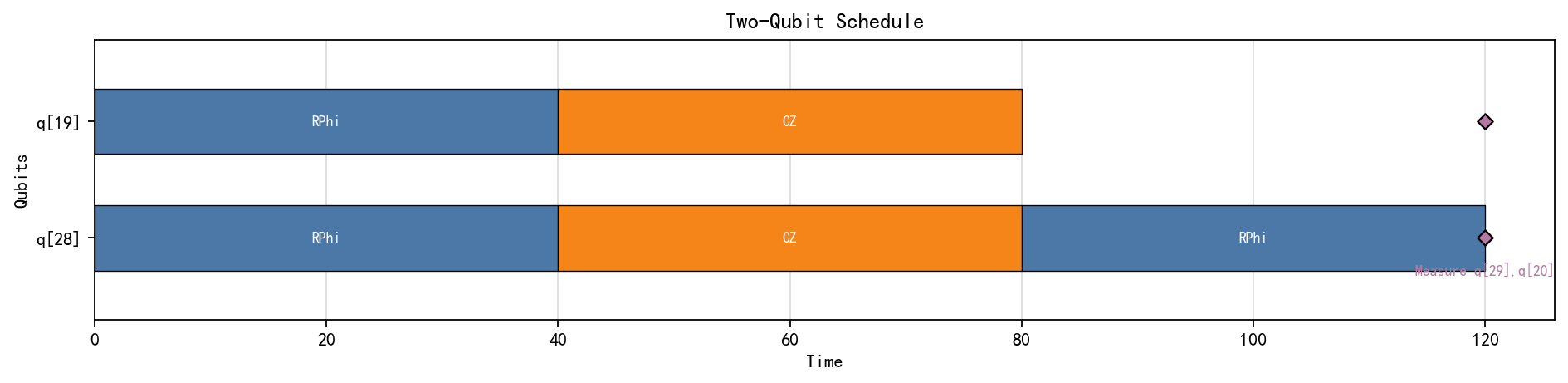
from pyqpanda3.visualization import draw_time_scheduling

multi_stream = [
    [
        {"RPhi": [20, 270.0, 90.0, 0]},
        {"RPhi": [29, 270.0, 90.0, 0]},
        {"CZ": [20, 29, 40]},
        {"RPhi": [29, 72.76854713789294, 90.0, 80]},
        {"Measure": [[29, 20], 120]},
    ],
    [
        {"RPhi": [20, 270.0, 90.0, 0]},
        {"RPhi": [29, 270.0, 90.0, 0]},
        {"CZ": [20, 29, 40]},
        {"RPhi": [29, 72.76854713789294, 90.0, 80]},
        {"Measure": [[29, 20], 120]},
    ],
]

figures = draw_time_scheduling(
    multi_stream,
    durations={"RPhi": 40, "CZ": 40},
    output="plotly",
    qubit_offset=-1,
)
for index, fig in enumerate(figures):
    fig.write_html(f"schedule-{index}.html")